Antivirus 2017: Security with a hint of surveillance

Modern antivirus tools use controversial techniques to monitor the user’s HTTPS traffic, which may affect the security of the whole system and put their privacy at risk. What powers should be deemed acceptable for tools protecting us from malware, and where is the red line?

Read my new article “Antivirus 2017: Security with a hint of surveillance” in the fresh issue of (IN)SECURE Magazine.

Writing passwords down without writing them down

Whether it is acceptable or not to write your passwords down has been a debatable question for ages. Just like any other eternal question, it doesn’t have a one-size-fits-all answer, with many factors affecting the final decision for every particular password. What we should admit though is that there are situations where writing a password down is hard to avoid, if possible at all. This is partially caused by the myriads of passwords we need to use to access different services, and the increased requirements for their length and complexity. In most scenarios, the two most important rules of thumb are that

using a complex password and writing it down is safer than using a simple one and not,

and

using different passwords and writing them down is safer than remembering a single, however complex, password and using it throughout.

And as long as we have to write our passwords down, it is quite important to do that right. This is because the passwords you write down are subject to a totally different scope of threats, comparing to the passwords you remember. While the passwords you keep in your memory are normally cracked with high-speed automated tools which use dictionaries to work out millions of passwords per second, the passwords you write down are likely to be found, stolen and used by humans. This, on the one hand, makes them somewhat easier to protect (‘we are all humans’, in the end), and on the other hand, the protection needs to be really smart (‘the computer is incredibly fast, accurate, and stupid. Man is unbelievably slow, inaccurate, and brilliant’).

Largely, there are three general rules you need to follow when writing down your passwords. Neither of those is a must, and some may appear too complicated, yet the more of them you will manage to follow, the safer your passwords will be.

The applicability of these rules is not limited with passwords – writing down your card details or any other sensitive information is subject to the same threats, and as such the same rules can be used to protect them.

The first and foremost rule,

Aim to only write passwords down where absolutely necessary.

There are plenty of ways to keep passwords secure without writing them down in plain. Use password managers or built-in browser facilities to remember the passwords for you, and protect them with sound master password. If unsure, back up the master password on a piece of paper using the rules given below. Generally, if there is a choice between writing your password down in plain in an electronic document on your computer or smartphone or on a piece of paper, choose the paper.

Hide as many facts as you can.

Don’t indicate it’s a password anywhere around it. This applies both to passwords written on the paper and those saved in your computer or smartphone as a note or file. Don’t name it ‘My Passwords.doc’, don’t place it in ‘Important Stuff’ folder, and so on. Keep it alongside your normal work documents/in a similarly looking folder on a shelf. If you need to keep your passwords in the Cloud, mix it up with some unrelated stuff. A friend of mine writes her passwords on an old newspaper, takes a picture of her cat playing with it, and saves the picture together with the rest of her photos – making it look like an innocent ‘yet another’ picture of her pet rather than an important password document.

Don’t write usernames. Normally you would only use few usernames across different online resources, the majority of which would be your e-mail address. Try remembering them instead of writing them down. By omitting the usernames, you make it harder for the villain to get use of the password.

Don’t mention the service to which the password belongs. If you follow the first rule, you will only have few passwords written down. Invent a system of indicating which password belongs to which resource, such as by using multi-colour sheets or sorting the passwords alphabetically. If absolutely necessary, use hints and associations instead of resource names.

Use multiple dimensions. Mix real and fake passwords. Write passwords on different media, use different pieces of multi-dimensional information to put the password together. Another friend of mine writes down his passwords on old business cards, and secretly uses letters and digits from names and telephone numbers printed on the cards as part of the passwords.

Finally,

Become a cryptography enthusiast – encipher your password!

When it comes to amateur kind of encryption, most of us would probably recall the technique that was used by American mafia in the Dancing Men story of the Sherlock Holmes series. The reality is that the cipher used by the mafia was not so good, as it was a basic one round substitution cipher with a constant key too easy to break, and, what is more important, it was a nightmare to use (go and try to remember an alphabet of 26 similarly looking shapes!) No wonder Sherlock managed to crack it right away.

Our goal here is to invent something more sophisticated yet easier to use for your passwords – and it’s not as difficult as you might think. Still, it is an important step, and contributing some quality brainwork will help make sure your passwords are safe. What you need to do here is invent a two-way transformation that would allow you to alter your passwords before writing them down, and reconstruct them back when you need to use them.

You can use the following techniques, combine them, or invent your own:

Change occasional letters. Avoid well-known schemes, such as replacing l with 1, E with 3, or B with 8. Everyone knows them. Invent your own scheme. One of the options is to take a random word in which no letter appears more than once, and use that word as a transformation mechanism. For example, a word ALMOST would instruct us to replace all A’s with L, all L’s with M, all M’s with O, all O’s with S, all S’s with T, and all T’s with A. To get the password back, you follow the reverse procedure, by replacing all A’s with T, all T’s with S, and so on.

Change the order of letters – e.g., by swapping letters on odd places with those on even places, or reverting the word as a whole.

Add random prefix, postfix and suffix – but make sure you remember how many characters and in what places you have added.

Sometimes it helps to write down a hint to remind you of the kind of changes that have been applied to the password, as long as the hint doesn’t disclose them right away.

All in all, the exact technique to use would depend on the criticality of the password that you need to hide. If you are only hiding your TV PIN from your kids, using a simple letter substitution would probably work just fine (though I personally would never underestimate the intelligence of kids!) If it’s your Paypal password that you keep in your wallet, you obviously need to apply a more sophisticated technique.

Now you know enough to start writing your passwords down securely. Please keep in mind, however, that the less information you give away, in any form, the safer you are, and only use the techniques described above where you have no other choice but to do it.
Good News

One of English translations of Victor Hugo’s words On résiste à l’invasion des armées; on ne résiste pas à l’invasion des idées reads as No army can stop an idea whose time has come. In our case, the army is even going to help promote such an idea instead of resisting it.

Atlantic Council is set to host a discussion that was long awaited by me and a solid crowd of experts in information security, business continuity and cyber risk management. The Cyber Risk Wednesday: Software Liability discussion will take place on November the 30th in Washington, DC.

The discussion will be dedicated to a difficult question of increasing liability of software vendors for defects in their products, and the ways of trading it off with economic factors. Taking into account the extent to which software, in a variety of forms, infiltrates into the inmost aspects of our lives (such as a smart house running a hot tub for you), as well as the extent to which we trust software in managing our lives for us (letting it run driverless cars and smart traffic systems), the question of liability is vital – primarily, as a trigger for vendors for employing proper quality assurance and quality control processes. That’s why I wholly welcome the Atlantic Council’s initiative, and truly hope that it will help raise awareness of the problem and give a push to wide public discussion of the same.

Autonomous collision attack on OCSP services

Finally finished my paper on issues in OCSP protocol and got it published on arXiv.org.

The most surprising outcome of the research was the fact that the majority of OCSP services are still using SHA-1 algorithm for calculating their signatures. Taking into account the importance of the role that OCSP responders play in trust environments, this might make them an attractive attack surface.

On security perimeters

It is my humble point of view that the ‘security perimeter’ concept used widely by security professionals and men in the street provides more harm than good. There are many reasons as to why it does, but the main one is that the use of this concept gives a false sense of security.

If you ask an average person what a security perimeter is, they will probably tell you something like ‘it is a warm and cozy place where I can relax and have my cake while everyone outside is coping with the storm.’

The problem is that it is not entirely so. Contrary to popular belief, security risks don’t go away when you are inside the perimeter. Instead, they transform, they change their sources, targets and shapes, but they are still there, waiting for the right moment to strike. What is particularly bad is that those risks are often overlooked by security staff, who only concentrate on risks posed by hostile outside environment (the storm) – but not the ‘safe’ environment inside the perimeter (yet, an odd cherry bone in the cake that might cause the man to choke to death).

The chaos at JFK is a good (well, not for its participants) illustration of this point. For sure, the area of supposed shooting was viewed by security people as belonging to the security perimeter (and extremely well-protected one – I bet it’s nearly impossible to get to the area even with a fake, not to say a real gun). They probably believed that as long as the borders of the perimeter are protected up to eleven, they don’t need to care about anything happening inside it. Indeed, they might have done a great job about protecting the passengers from gunfire, but they overlooked an entirely different type of risk – which, happily, didn’t cause any casualties.

That’s why any security perimeter (in the meaning of ‘straightforward defence facility’) should be viewed not as a security perimeter, but rather as a transition point from one security setting to another. In no way the inner setting is more secure than the outer one – and sometimes it can even be more dangerous than the outer one (imagine there’s no one in to help the choked man deal with the bone). Thinking in this way will help to make a clearer picture of the variety of risks targeting every particular security setting, and come up with appropriate countermeasures.

Now official: SMS is not a viable second authentication factor

A lot has been said on this topic, but now it’s official: SMS is not a viable second authentication factor in 2FA.

However, as I wrote earlier, it’s not specifically the text messages that are the primary source of troubles for phone-based authentication, but rather the whole authentication model relying solely on the mobile phone activities. Still, it’s great that NIST is aware of the problem and is making steps towards improving the security of 2FA.

Cloud services as a security risk assessment instrument

One of the hidden gems of cloud computing platforms (how many more of them are out there?) is the possibility of performing quite accurate quantitative assessment of risks to security systems.

The strength of a big share of information security measures rests on computational complexity of attacks on underlying security algorithms. To name a few, you need to factor some 2048 bit integer to crack an RSA key, you need to get through an average of 2^127 tries to recover an AES encryption key, you need to iterate over 20 million dictionary passwords to find the one matching the hash, and so on – I’m sure you’ve got the idea. All of these tasks require enormous amounts of time and computational resources, and the unavailability of those to the vast majority of potential attackers is the cornerstone of modern data security practices. This hasn’t changed much for last several decades – yet, something around it has.

In ye goode olde days, a security architect had to rely on some really vague recommendations when deciding which security parameters to employ in the system, which often sounded more like voodoo predictions rather than a well-defined formally justified methodology. These ones from NIST, for example, literally say, ‘if you want your data to be secure up until 2030, protect it with 128 bit AES’. Hmm, okay. And what are the chances of my data being cracked by 2025? 2035? What if the data I encrypt is really valuable – would it be worthwhile for the attacker to jump over their head and try to crack the key well before 2030? What is the price they’d have to pay to do that and what are the chances they’d succeed?

The rise of cloud computing platforms brought in a big deal of certainty onto the table. With the availability of commercial cloud platforms one can estimate the costs of breaking a computation-dependent security scheme unbelievably accurately. Back in 2012, the cost of breaking a scheme by a potential attacker could hardly be estimated. It was believed that the NSA probably has the power to break 1024 bit RSA, and a hacker group big enough could probably break SHA-1 with little effort. Probably.

Everything is different today. Knowing the durability of the security system they need to deploy or maintain, and being aware of the computational effort needed to break it, a security architect can estimate the ceiling of the price the attacker needs to pay to conduct a successful attack on the system – in dollars and cents.

To obtain that estimation the security architect would create a scalable cloud application that emulates the attack – e.g. by iterating over those 20 million passwords in distributed manner. Afterwards, they would work closely with the cloud service provider to figure out the price of running that application in the cloud, which will be a function of the system’s security parameters and the amount of time needed to conduct the attack. Having built the price function, they would be able to make a justified and informed decision about the security parameters to employ, by balancing the attack duration and cost with any benefits the attacker would get from a successful attack. This is a huge step forward in the field of security risk assessment, as it allows to describe the strengths and weaknesses of the security system in well-defined ‘I know’ terms rather than ‘I feel’, and view the system from a business-friendly ‘profit and loss’ perspective as opposed to enigmatic ‘vulnerabilities and their exploitation’.

It is worth mentioning that a good security architect would then monitor any changes around the cost of breaking the system, including changes in the cloud service providers’ SLAs and price schedules, and be prepared to make any necessary amendments to the risk figures and the security plan. With computation prices going down all the time, reviewing the risks periodically is vital to guarantee the continuous security of the system.

Why your mobile phone is NOT a second authentication factor

Mobile phones are often employed as the second factor in various two-factor authentication schemes. A widely used authentication scenario involves a text, call or other kind of notification sent to your mobile phone by the service you are accessing, and authenticating you by your ability to confirm its contents. The problem here is that despite claiming their support for two-factor authentication, a lot of Internet services actually design or set it up improperly, ending up with providing not the security, but a false sense of it.

Let’s recall what two-factor authentication (2FA) is. In contrast to traditional single-secret authentication schemes, such as password-based, with 2FA you combine two different pieces of evidence to prove your identity, so that an attacker gaining access to one of the evidences couldn’t take your identity over without having access to the other. This is supposed to significantly reduce the risk of your account being hacked, as the attacker now needs two different pieces of evidence (such as your password and your fingerprint) to gain access to your account.

A lot of people are confused by the terminology 2FA evangelists use to explain the nature of the scheme. They often classify the authentication compounds into something you have, something you know and something you are, and demand that the two pieces of evidence you present to authenticate yourself must fall into two different categories. This classification is not entirely correct and slightly mixes the things up. Strictly speaking, under certain conditions you can successfully use two something you know‘s as two authentication factors; conversely, simply the presence of something you have and something you know together doesn’t guarantee the security of the overall scheme.

A much more important (and correct) requirement for choosing the two authentication factors is their independence of each other. Neither of the factors, when cracked by the attacker, should give her a tiny bit of information about the second factor. If a 2FA scheme manages to satisfy this condition, it can be good (subject to the implementation details and exact authentication methods used), but if it doesn’t – it’s definitely not.

A very common problem with using 2FA on a mobile phone (in-app or in-browser) is that the two factors chosen by the services are not entirely independent from each other. A typical phone usage scenario involves an e-mail app which is always open and authenticated; a number of social network apps with the user signed in; an Internet browser with a bunch of opened sessions. In most cases, access to the e-mail app alone will be enough to gain access to any services you use that are bound to your e-mail address. If your phone gets stolen, the services which are set up to use your mobile phone number as a second authentication factor, as well as a ‘recovery’ password reset point, when requested, will text their one-time access codes… correct, straight into the hands of the thief.

This way, typical something you have and something you know factors, when used exclusively on one device, blur into one big something you have. Any ‘second’ factor employed by a mobile app or service, unless it works via a communication channel totally external to your mobile phone, just extends the first factor and doesn’t add up to the overall account security.

Notwithstanding the above, your phone still can be used as a proper 2FA factor. The main idea here is that you should not be able to authenticate yourself solely with your phone, whatever services and their combinations your phone offers you would use. There must be some other, external and independent factor involved. A variety of options are available here, from using your desktop computer or a different mobile phone for providing the second factor, up to sending in your fingerprints or retina sample. If the authentication can be performed with the sole use of your phone, it is never a 2FA.

Access wrongs

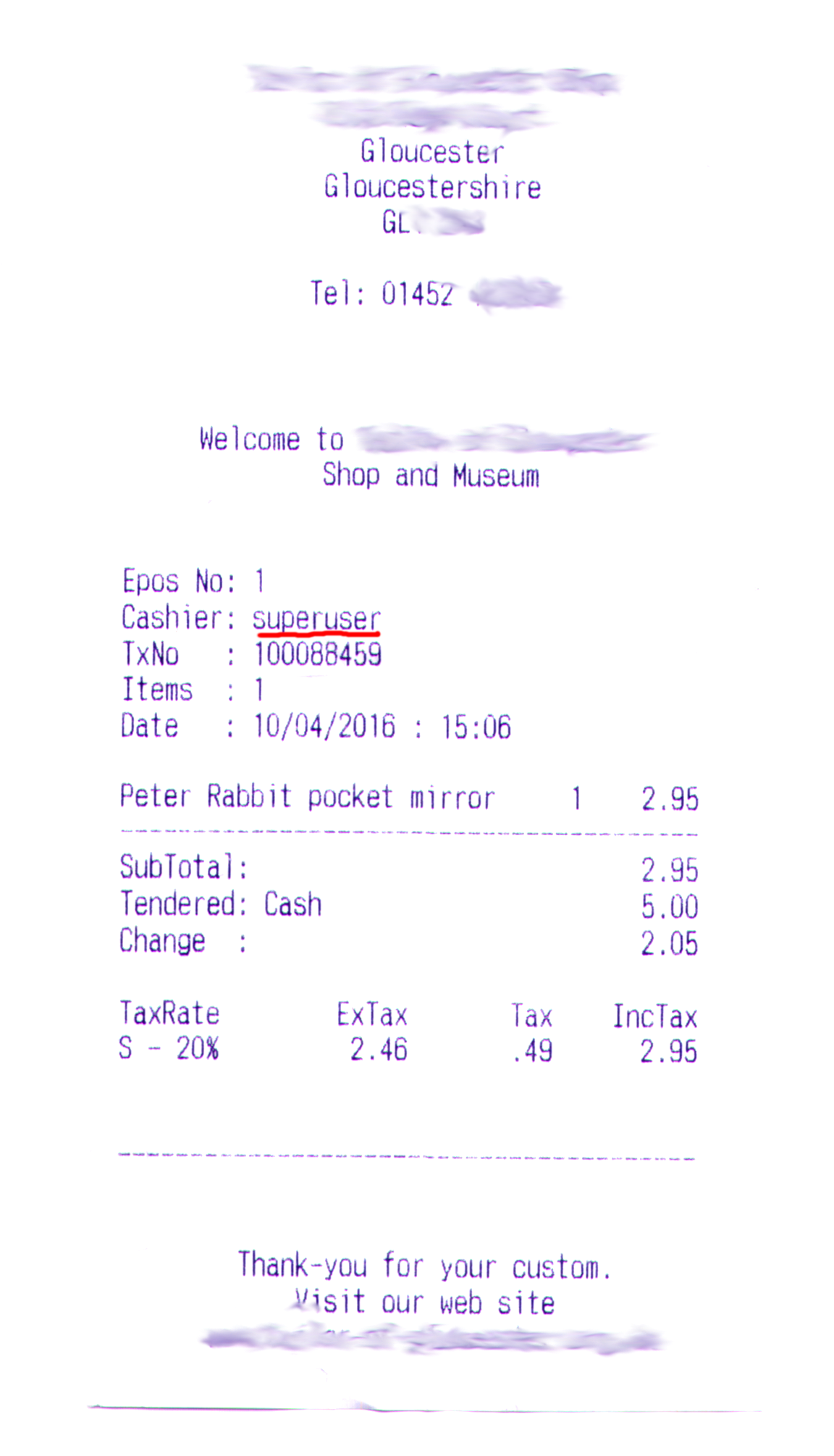
I was given this receipt at one of the shops in Gloucester. The owner of this shop puts her network at risk by conducting all her business activities, however small, from under the superuser account. It may only take a dozen of seconds for an intermediate level opportunist hacker to set up a backdoor while their friend is distracting the cashier – and then hack into the shop computer and arrange a whopping 99%-off sale for them and their friends.

ReceiptEd
Negligence towards proper access rights management is one of the most common causes for security breaches. While other data protection instruments, such as encryption, backup routine, or firewalls, are ‘touchable’ in some sense, access control is ‘imperceptible’, and requires a lot of care to be set up properly. At the same time, improperly configured access control may easily jeopardize all other security instruments, as it would let the attacker walk in through the front door instead of squeezing through the window leaf or tearing down a (however protected) side wall.

The need-to-know principle, or the principle of least privilege, remains to be the most effective rule for setting up access rights correctly. To put it short, only give users access to information and functions they need to perform their duties – and forbid all the rest.

My pet, my flaw

I’ve just found out that my cat’s vet surgery inserts their patients’ names to the transaction identifiers when taking direct debit payments. For example, here’s the whole direct debit transaction ID as shown on my bank statement:

DE06287259MYCROFT

where ‘MYCROFT’ would be my cat’s name.

Taking into account that many, many, many banks use their customer pets’ names as one of security questions, this might pose a real risk. A dishonest bank worker, – or, well, anyone who could intercept the statements en route to your house, – might use that information to gain access to your bank account.

Moreover, the transaction info also says that the payment was taken on behalf of a nationwide vet alliance and not my petite village surgery. This makes me think that a large number of other small vet surgeries over the country use the same umbrella company to take direct debit payments on their behalf, putting the assets of their customers at risk.